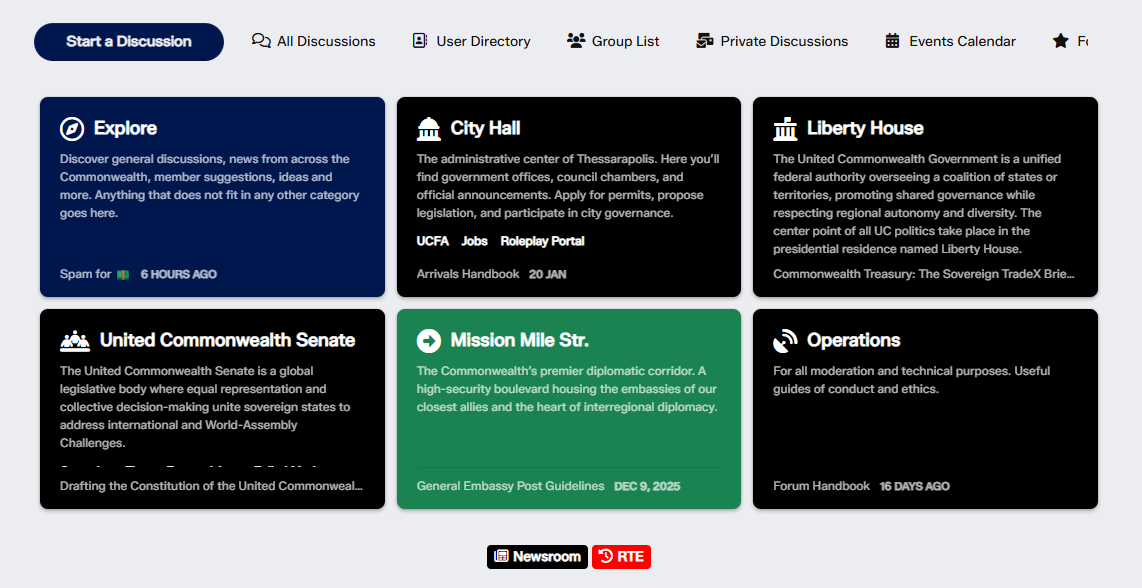
Welcome to the community! Tags are the backbone of how discussions are organized here. Using them correctly helps everyone find relevant topics faster and keeps the forum neat and easy to navigate. Here’s what you need to know:
✅ What Are Tags?
Tags are labels that classify discussions. Instead of rigid categories, we use a flexible tag system:
Primary Tags: Main sections of the forum (e.g., Explore, City Hall, Liberty House etc).
Secondary Tags: Optional tags that add extra context (e.g., under City Hall, you might see UCFA, Jobs, Roleplay Portal etc).
✅ How to Use Tags When Posting
Choose ONE primary tag that best fits your topic.
Example: Looking for a work? Select City Hall.
Add secondary tags for clarity.
Example: Seeking or offering a job? Add Jobs as a secondary tag.
Avoid unrelated tags—they confuse readers and moderators.
✅ Why Tags Matter
Better visibility: Correct tags make your post easier to find.
Faster help: Community leads often monitor specific tags.
Community organization: Proper tagging keeps discussions relevant.
✅ Some useful tips
Follow Tags: Subscribe to tags to get notified about new discussions.
Search by Tags: Use tag filters to find topics quickly.
Respect Tag Rules: Moderators may edit tags if they’re incorrect.
Templates: Some tags have posting templates (e.g., bug reports)—use them for structured posts.